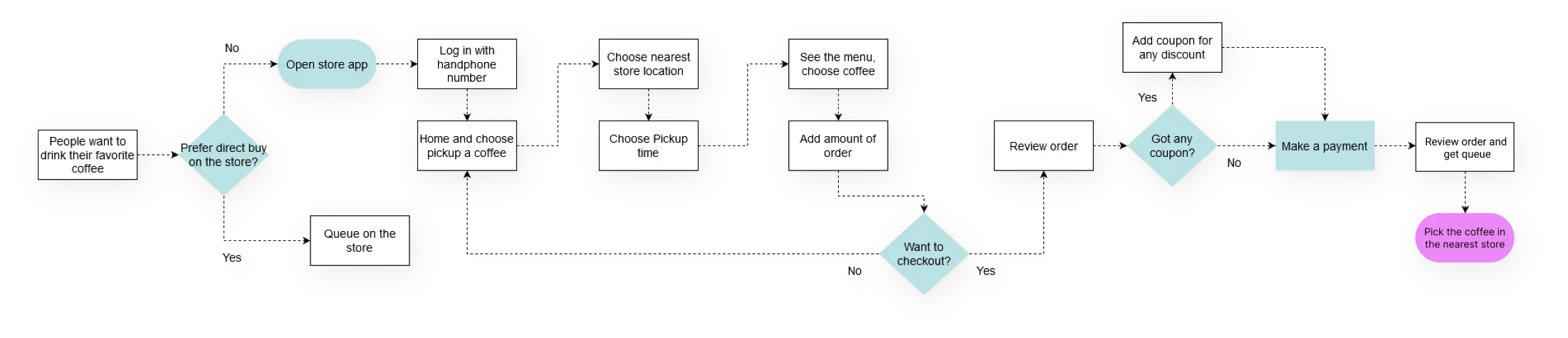
What is Flowchart?

January 1, 2026

Before we go to know the flowchart yet, we know every process can be translated to be a flow or flowchart.


So, what is process?

An activity, the changes or transforms some input(s) to create an output.


Process looks like


To make it easier we can use flowchart to make the process more easier to understand.


What is Flowchart?

A diagram that depicts a process, system or computer algorithm. The flowchart are widely used in multiple fields to document, study, plan, improve and communicate often complex processes in clear, easy-to-understand diagrams. -Lucidchart.com.


Do you know what is the history?

The first structured method for documenting process flow, the "flow process chart", was introduced by Frank and Lillian Gilbreth in the presentation "Process Charts: First Steps in Finding the One Best Way to do Work", to members of the American Society of Mechanical Engineers (ASME) in 1921. -https://en.wikipedia.org/wiki/Flowchart
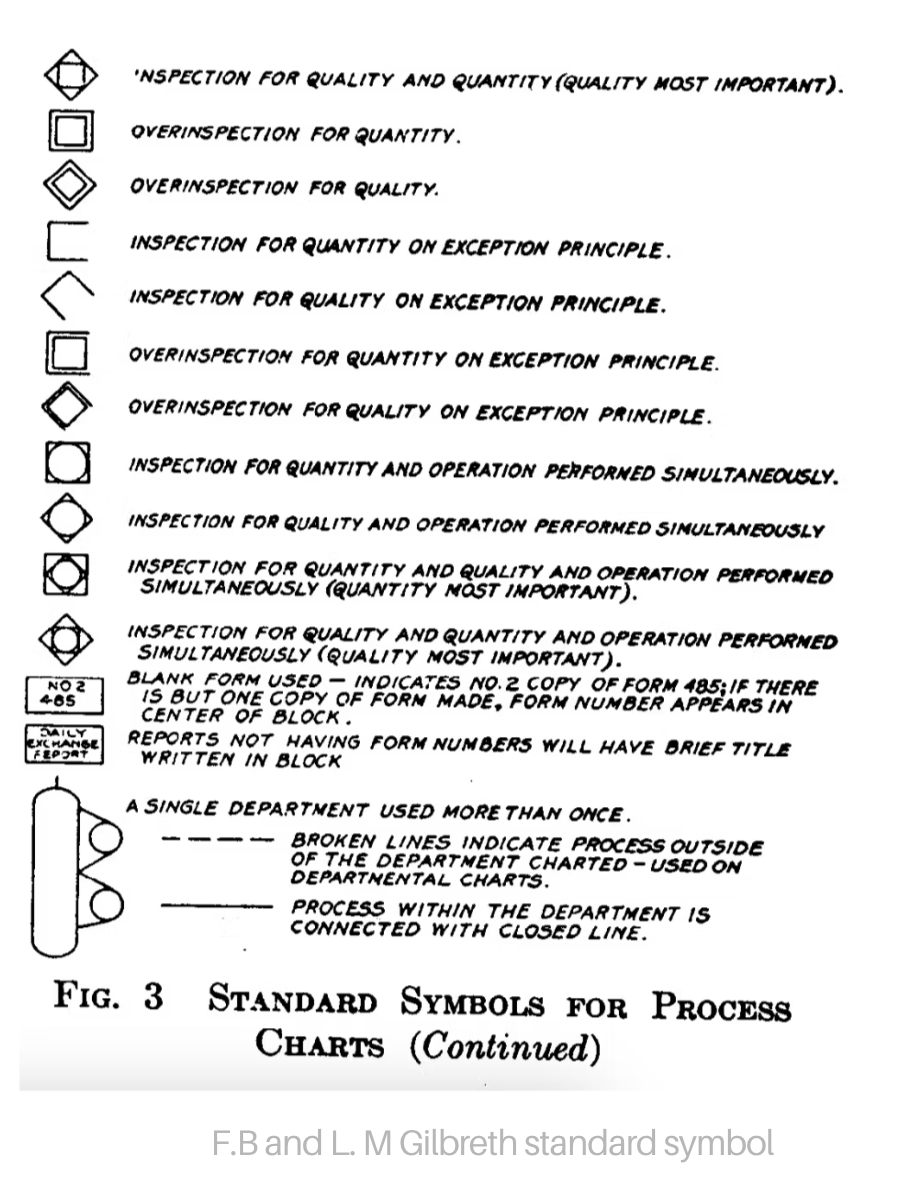

F.B and L. M Gilbreth standard symbol


The purpose of the flowchart

  1. Flowchart is very powerful for understanding the process. Because NOBODY know the process.
  2. Often leads to the elimination of unnecessary works (brainstorming/iteration phase).


When to use a Flowchart?

  • To develop an understanding of how a process is done
  • To study a process for improvement
  • To communicate to others how a process is done
  • When better communication is needed between people involved with the same process
  • To document a process


Types of flowchart

  1. High-Level (Flow that leverage step symbols.)

High level flowchart

  1. Detailed (Flowchart that leverage all symbols​.)

Detailed flowchart


Flowchart is full of symbol, what is symbol?

Flowchart symbol has many standard shapes, and it depends on the industry. The American National Standards Institute (ANSI) set standards for flowcharts and their symbols in the 1960s. Example of conventional symbol:
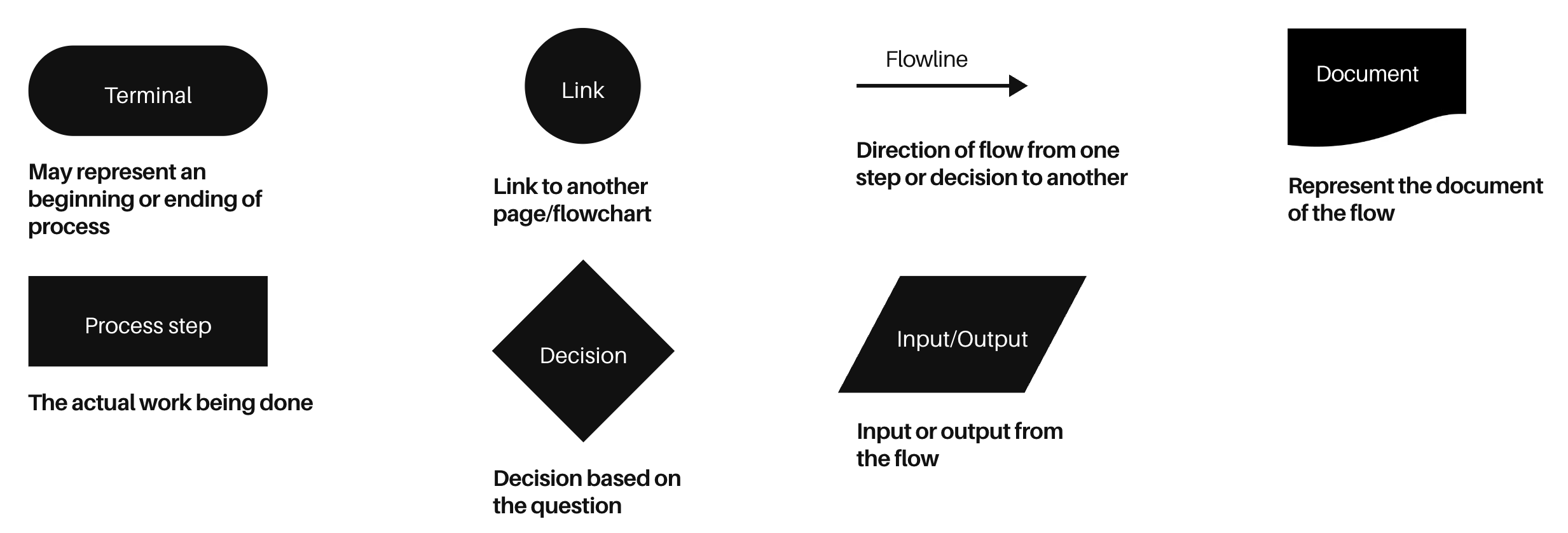
Flowchart symbol


Besides symbol, flowchart use color to indicate which status. Color can be used to:

  1. The particular symbol such as every positive output is mark as green or negative output as red and another color to indicate the start and an end.
  2. Ensure the readibilty and pay attention to avoid color contrast for the symbol color.
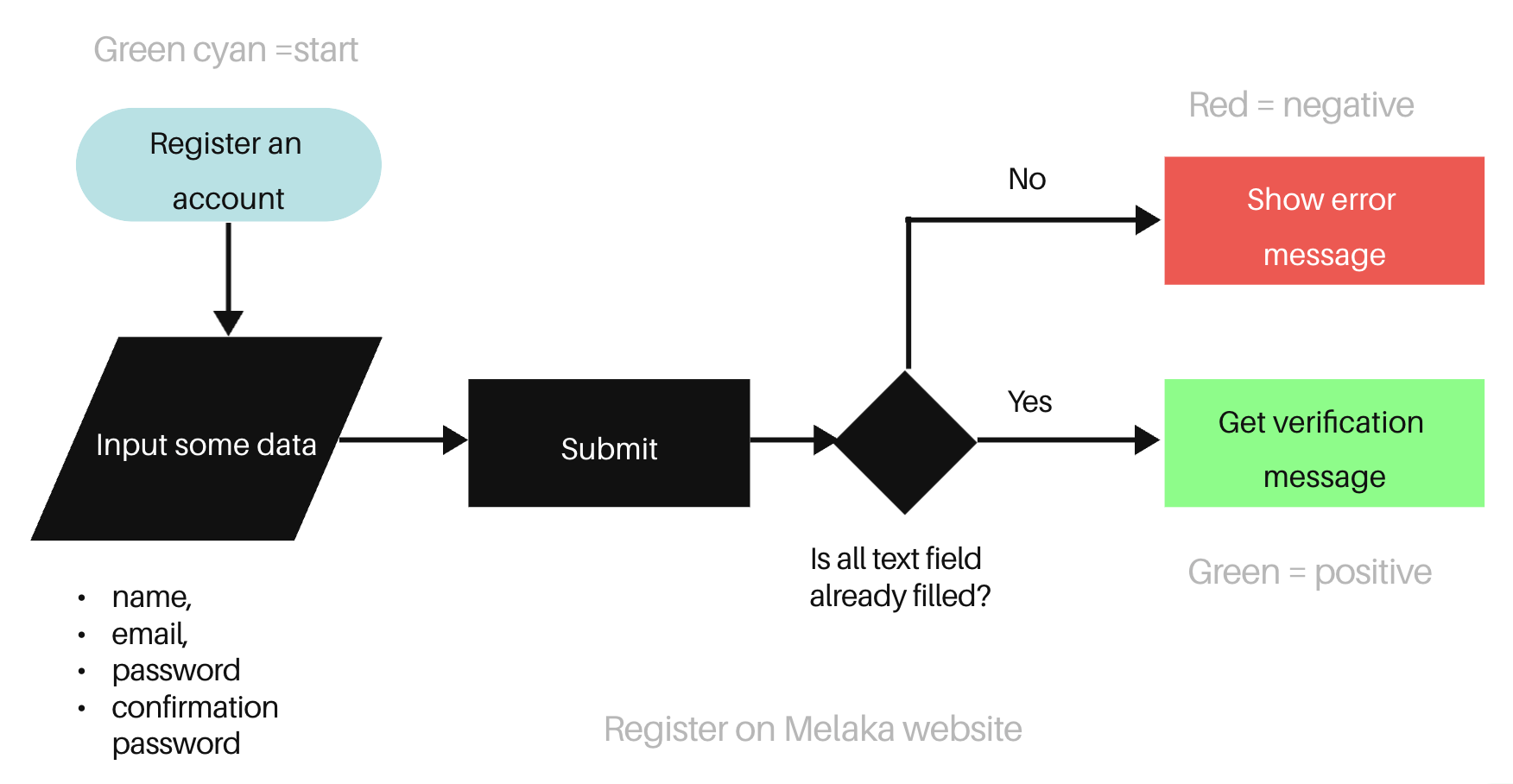
Flowchart color


How good and bad the Flowchart can be?

  • Bad ones it's difficult to use because the line and shape aren't alignment and it's monochromatic.
  • Good ones have proper alignment, different color on symbol.

FBad vs good flowchart


Flowchart should shows:

  1. Start and End
  2. Required steps
  3. Sequence or order of the steps
  4. From top to bottom or left to right


Last, the example of flowchart that can be used in Design process

  1. Task flow → lowest fidelity of the flow (e.g. finding a pancake recipe)
  2. User flow → single persona of user (e.g. Making a pancake)

Finding a pancake recipe


A tools that will help you to create a flowchart. Example of the tools: Draw.io, Miro, FigJam and etc.


Conclusion:

  1. The level of detail of the flowchart may vary depending on you (flowchart maker).
  2. Try mapping regularly to improve flowchart creation and important to stick on the purpose of flowchart.
  3. How to validate a flowchart? Please collab with your teammates to challenge your flowchart.


---

Reference:

  1. Flowchart in ASQ.org
  2. Coursera: Flowchart & Process Mapping
  3. Coursera: Leading changes in Health Informatics
  4. Lucidchart: Flowchart symbols and notation
  5. Creatly: Choosing color to improve your diagram
  6. Deliverable UX: UX Flow Diagram
  7. Medium: Taskflow vs Userflow

What is Flowchart?

January 1, 2026

Before we go to know the flowchart yet, we know every process can be translated to be a flow or flowchart.


So, what is process?

An activity, the changes or transforms some input(s) to create an output.


Process looks like


To make it easier we can use flowchart to make the process more easier to understand.


What is Flowchart?

A diagram that depicts a process, system or computer algorithm. The flowchart are widely used in multiple fields to document, study, plan, improve and communicate often complex processes in clear, easy-to-understand diagrams. -Lucidchart.com.


Do you know what is the history?

The first structured method for documenting process flow, the "flow process chart", was introduced by Frank and Lillian Gilbreth in the presentation "Process Charts: First Steps in Finding the One Best Way to do Work", to members of the American Society of Mechanical Engineers (ASME) in 1921. -https://en.wikipedia.org/wiki/Flowchart


F.B and L. M Gilbreth standard symbol


The purpose of the flowchart

  1. Flowchart is very powerful for understanding the process. Because NOBODY know the process.
  2. Often leads to the elimination of unnecessary works (brainstorming/iteration phase).


When to use a Flowchart?

  • To develop an understanding of how a process is done
  • To study a process for improvement
  • To communicate to others how a process is done
  • When better communication is needed between people involved with the same process
  • To document a process


Types of flowchart

  1. High-Level (Flow that leverage step symbols.)

High level flowchart

  1. Detailed (Flowchart that leverage all symbols​.)

Detailed flowchart


Flowchart is full of symbol, what is symbol?

Flowchart symbol has many standard shapes, and it depends on the industry. The American National Standards Institute (ANSI) set standards for flowcharts and their symbols in the 1960s. Example of conventional symbol:

Flowchart symbol


Besides symbol, flowchart use color to indicate which status. Color can be used to:

  1. The particular symbol such as every positive output is mark as green or negative output as red and another color to indicate the start and an end.
  2. Ensure the readibilty and pay attention to avoid color contrast for the symbol color.

Flowchart color


How good and bad the Flowchart can be?

  • Bad ones it's difficult to use because the line and shape aren't alignment and it's monochromatic.
  • Good ones have proper alignment, different color on symbol.

FBad vs good flowchart


Flowchart should shows:

  1. Start and End
  2. Required steps
  3. Sequence or order of the steps
  4. From top to bottom or left to right


Last, the example of flowchart that can be used in Design process

  1. Task flow → lowest fidelity of the flow (e.g. finding a pancake recipe)
  2. User flow → single persona of user (e.g. Making a pancake)

Finding a pancake recipe


A tools that will help you to create a flowchart. Example of the tools: Draw.io, Miro, FigJam and etc.


Conclusion:

  1. The level of detail of the flowchart may vary depending on you (flowchart maker).
  2. Try mapping regularly to improve flowchart creation and important to stick on the purpose of flowchart.
  3. How to validate a flowchart? Please collab with your teammates to challenge your flowchart.


---

Reference:

  1. Flowchart in ASQ.org
  2. Coursera: Flowchart & Process Mapping
  3. Coursera: Leading changes in Health Informatics
  4. Lucidchart: Flowchart symbols and notation
  5. Creatly: Choosing color to improve your diagram
  6. Deliverable UX: UX Flow Diagram
  7. Medium: Taskflow vs Userflow

What is Flowchart?

January 1, 2026

Before we go to know the flowchart yet, we know every process can be translated to be a flow or flowchart.


So, what is process?

An activity, the changes or transforms some input(s) to create an output.


Process looks like


To make it easier we can use flowchart to make the process more easier to understand.


What is Flowchart?

A diagram that depicts a process, system or computer algorithm. The flowchart are widely used in multiple fields to document, study, plan, improve and communicate often complex processes in clear, easy-to-understand diagrams. -Lucidchart.com.


Do you know what is the history?

The first structured method for documenting process flow, the "flow process chart", was introduced by Frank and Lillian Gilbreth in the presentation "Process Charts: First Steps in Finding the One Best Way to do Work", to members of the American Society of Mechanical Engineers (ASME) in 1921. -https://en.wikipedia.org/wiki/Flowchart


F.B and L. M Gilbreth standard symbol


The purpose of the flowchart

  1. Flowchart is very powerful for understanding the process. Because NOBODY know the process.
  2. Often leads to the elimination of unnecessary works (brainstorming/iteration phase).


When to use a Flowchart?

  • To develop an understanding of how a process is done
  • To study a process for improvement
  • To communicate to others how a process is done
  • When better communication is needed between people involved with the same process
  • To document a process


Types of flowchart

  1. High-Level (Flow that leverage step symbols.)

High level flowchart

  1. Detailed (Flowchart that leverage all symbols​.)

Detailed flowchart


Flowchart is full of symbol, what is symbol?

Flowchart symbol has many standard shapes, and it depends on the industry. The American National Standards Institute (ANSI) set standards for flowcharts and their symbols in the 1960s. Example of conventional symbol:

Flowchart symbol


Besides symbol, flowchart use color to indicate which status. Color can be used to:

  1. The particular symbol such as every positive output is mark as green or negative output as red and another color to indicate the start and an end.
  2. Ensure the readibilty and pay attention to avoid color contrast for the symbol color.

Flowchart color


How good and bad the Flowchart can be?

  • Bad ones it's difficult to use because the line and shape aren't alignment and it's monochromatic.
  • Good ones have proper alignment, different color on symbol.

FBad vs good flowchart


Flowchart should shows:

  1. Start and End
  2. Required steps
  3. Sequence or order of the steps
  4. From top to bottom or left to right


Last, the example of flowchart that can be used in Design process

  1. Task flow → lowest fidelity of the flow (e.g. finding a pancake recipe)
  2. User flow → single persona of user (e.g. Making a pancake)

Finding a pancake recipe


A tools that will help you to create a flowchart. Example of the tools: Draw.io, Miro, FigJam and etc.


Conclusion:

  1. The level of detail of the flowchart may vary depending on you (flowchart maker).
  2. Try mapping regularly to improve flowchart creation and important to stick on the purpose of flowchart.
  3. How to validate a flowchart? Please collab with your teammates to challenge your flowchart.


---

Reference:

  1. Flowchart in ASQ.org
  2. Coursera: Flowchart & Process Mapping
  3. Coursera: Leading changes in Health Informatics
  4. Lucidchart: Flowchart symbols and notation
  5. Creatly: Choosing color to improve your diagram
  6. Deliverable UX: UX Flow Diagram
  7. Medium: Taskflow vs Userflow